
A SMALL UTILITY FOR A BIG SKY

The sky,
one click away.

Your Moon sign, planetary shifts, and the moments ahead. Right in your Mac’s menu bar.

Free & open source · macOS 14+ · Apple Silicon

Unreleased — 0.1.0
Build from source today. Signed app download coming soon.

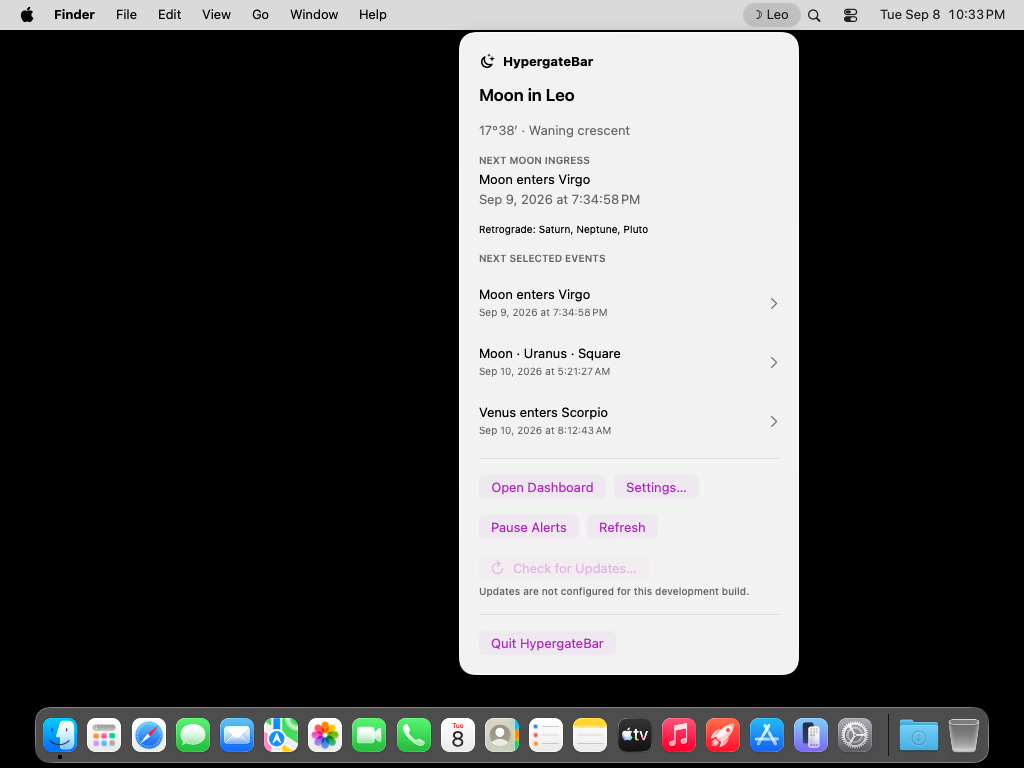
Actual macOS app · September 8, 2026 sample

Native by nature.
SwiftUI. Fast. At home on your Mac.

Your Mac does the math.
Real calculations. Fully offline.

Open all the way down.
Readable code. No account required.

A GLANCE. OR THE WHOLE PICTURE.

Small in the menu bar.
Room to look ahead.

Open the Dashboard when you want more context. Explore exact event times, planetary motion, and a forecast that stretches up to 90 days.

Real app screenshots
Today Dashboard with Moon sign, phase and the next selected events.
01 / THE SKY

Ten bodies. One clear view.

See tropical, geocentric positions from the Sun to Pluto, with signs, degrees, and direct or retrograde motion.

02 / WHAT’S NEXT

Follow the turning points.

Sign ingresses, squares, oppositions, and exact stations. Optional conjunctions and minor aspects when you want them.

03 / YOUR RHYTHM

Reminders on your terms.

Choose bodies, event types, and lead times. Set quiet hours or pause it all. Alerts stay off until you enable them.

HYPERGATE AI OPEN SOURCE

Good tools should
be yours to explore.

No subscription. No sign-in. No AI-generated sky. HypergateBar calculates astronomical events on your Mac with Astronomy Engine, and gives you the source to see how it works.

hypergate · CLI
# The same engine. Your own workflow.
$ hypergate sky \
    --at 2026-09-08T19:00:00Z \
    --json

# Plan the month ahead.
$ hypergate events \
    --from 2026-09-08T00:00:00Z \
    --to 2026-10-08T00:00:00Z \
    --types ingress,square,station \
    --json

Example commands · versioned JSON · reusable Swift library

BUILT IN THE OPEN

A clear record
of what’s changing.

Read the changelog

LATEST DEVELOPMENT UPDATE

Unreleased — 0.1.0

  • HypergateApp.com landing page with AERA / Hypergate AI and HypergateBar paths, plus coming-soon previews. HypergateBar now lives at /hypergate-bar/.
  • A public product website with GitHub source links and this repository-backed changelog.
  • Menu-bar update availability and an Update action, with automatic checks in configured publisher builds and a user-controlled Settings toggle.
All changes

MAKE A LITTLE ROOM IN YOUR MENU BAR

Start with the source.

HypergateBar is in its first open-source preview. Build it locally with Xcode and Swift 6. The signed macOS download will be linked here when it’s ready.

Requires macOS 14+, Xcode with Swift 6, Python 3, and Git. Initial dependency setup needs internet; the app’s core works offline.

Full build instructions ↗
Terminal
git clone https://github.com/theleoking-astrology/hypergate-bar.git
cd hypergate-bar
make run

A few useful details.

Does HypergateBar need an account or internet?

No account is needed. The native app calculates the sky locally. Building from source downloads its dependencies once. Future optional updates require a connection; the core calculations do not.

Is there a ready-to-download Mac app?

Not yet. The source is available now, and local development builds work without an Apple Developer account. A signed and notarized download will be linked here after release verification.

How accurate are the calculations?

The supported input range is 2000–2050. Independent tests compare 1,040 positions and 88 representative events against JPL Horizons. All registered gates passed for those samples. Numerical precision is not the same as astronomical accuracy. Read the measured results and limitations.

Will reminders always arrive exactly on time?

macOS manages delivery. Sleep, Focus, permission, and other system settings can delay or suppress it. The app shows the actual queued coverage, which can be shorter than its forecast. It needs to run again to replenish reminders.

Can I build something with the calculation engine?

Yes. HypergateCore is a reusable Swift package, with a separate provider adapter, a compiled consumer example, a CLI and a documented JSON schema. Original code is MIT licensed. Start with the developer guide.